
If I died tomorrow, would my family know where everything is?
Upload your statements, paste one prompt, and AI fills in every account, policy and bill in about 10 minutes. A monthly check-in keeps it current, so it's ready the day your family needs it.
Get The Last Spreadsheet · $39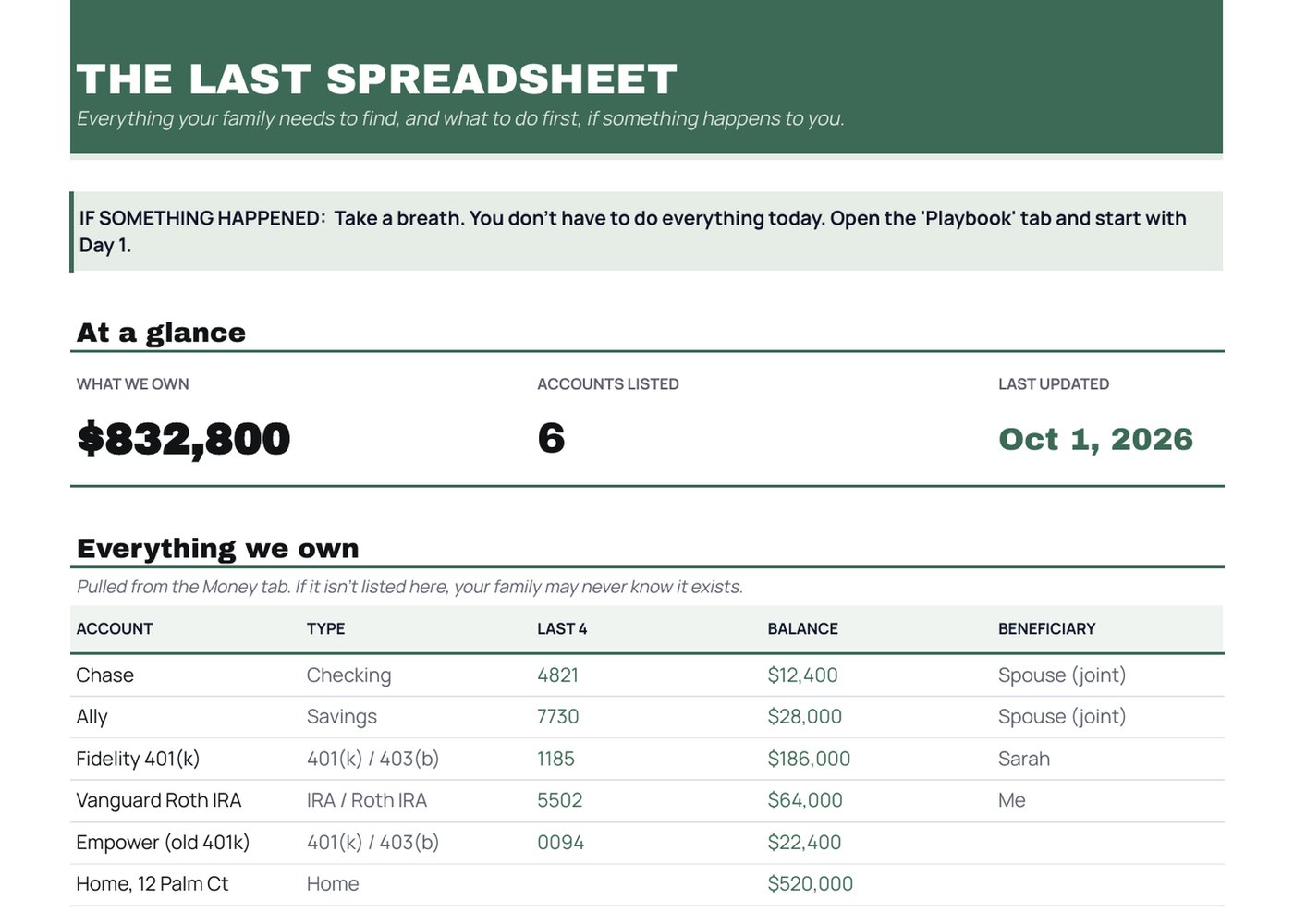








Most families learn what they don't know on the worst day of their lives.
In most households, one person handles the money. They know which accounts exist, which bills autopay and who to call. When that person is suddenly unavailable, everyone else starts from zero: digging through mail, guessing at logins and calling companies that won't talk to them.
Where's the money?
Bank accounts, retirement savings and investments nobody else knows about, including the old 401(k) from two jobs ago.
What needs to be paid?
The mortgage, utilities, insurance, subscriptions and every recurring bill, plus which to keep and which to cancel.
What happens next?
Who to call, which documents to find and what to handle first.
AI does the typing. You check the answers.
No blank spreadsheet to stare at. One prompt, about 10 minutes.
Upload and paste one prompt
Statements, last year's 1099s, a pay stub, your credit report. AI finds every account, policy and bill, including the old 401(k) you forgot. Rather not upload? A second prompt interviews you instead.
Paste the rows back
The AI tells you which cell each box goes in. Copy, click, paste. Start Here, your totals and the Playbook fill in on their own.
Turn on the monthly check-in
Your AI checks your email for new accounts, policies and beneficiary changes, and hands you the updates.
| Account | Type | Last 4 | Balance | Beneficiary |
|---|---|---|---|---|
| Chase | Checking | 4821 | 12,400 | Spouse (joint) |
| Fidelity 401(k) | 401(k) | 1185 | 186,000 | Sarah |
| Empower (old 401k) | 401(k) | 0094 | 22,400 | Blank |
Illustration with sample data. Works with Claude or ChatGPT. Prefer to type it yourself? That works too.
Most organizers are out of date by the time anyone needs them.
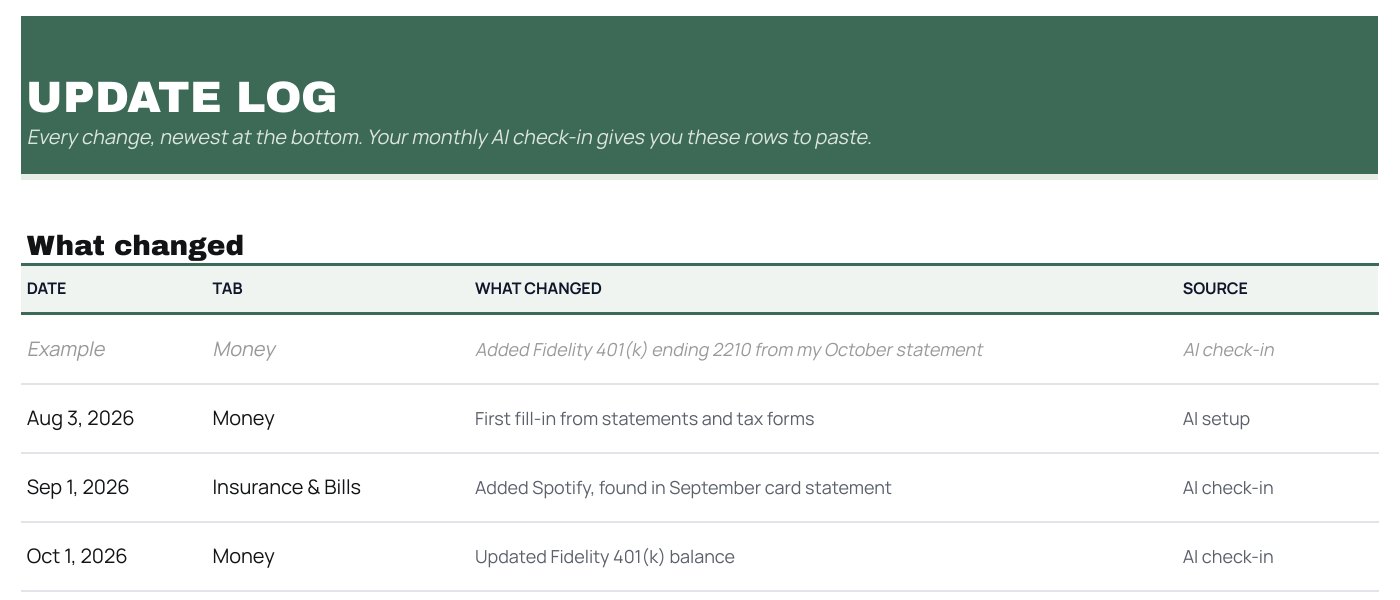
Accounts open and close. Policies renew. Beneficiaries change. Turn on the optional monthly check-in and your AI scans your email for what changed, then hands you the rows to update. Two minutes.
- New or closed accounts
- New, renewed or cancelled insurance
- Beneficiary change confirmations
- New subscriptions and paid-off loans
Every change lands in the Update Log, and Start Here shows the date of the last update, so your family knows it's current.
No passwords. No account numbers. Just where things are.
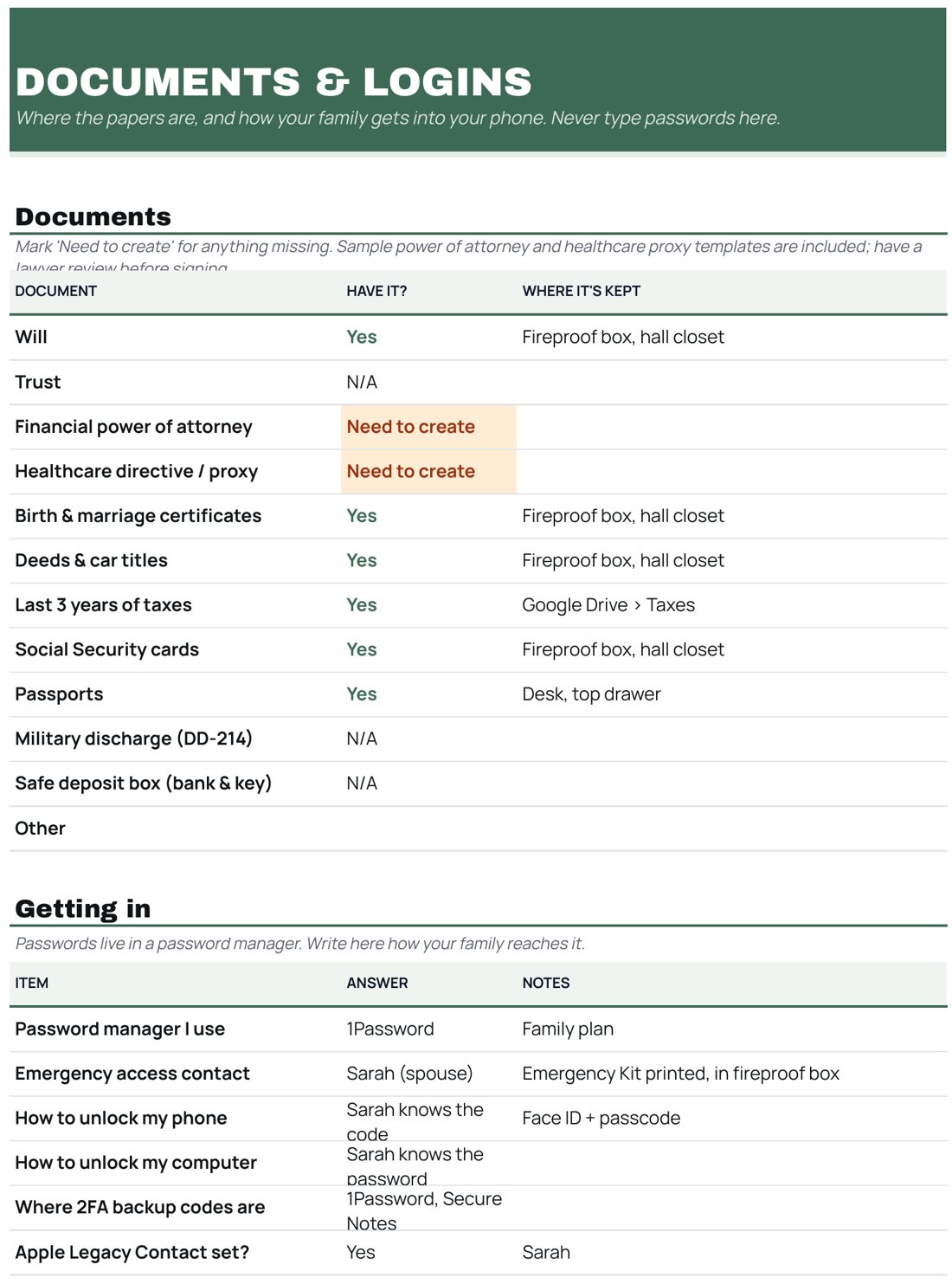
Your family doesn't need your passwords in a spreadsheet. They need to know which accounts exist, who to call and how to get into your phone.
- Bank name + last 4 digits
- Who to call, in order
- Where the will is kept
- Where your 2FA backup codes are
- Passwords
- Social Security numbers
- Full account numbers
- The backup codes themselves
The prompt tells the AI to keep only the last 4 digits. The toolkit shows you how to keep your chats out of AI training. Your copy lives in your own Google account. Ian never sees it.
One spreadsheet. Everything organized.
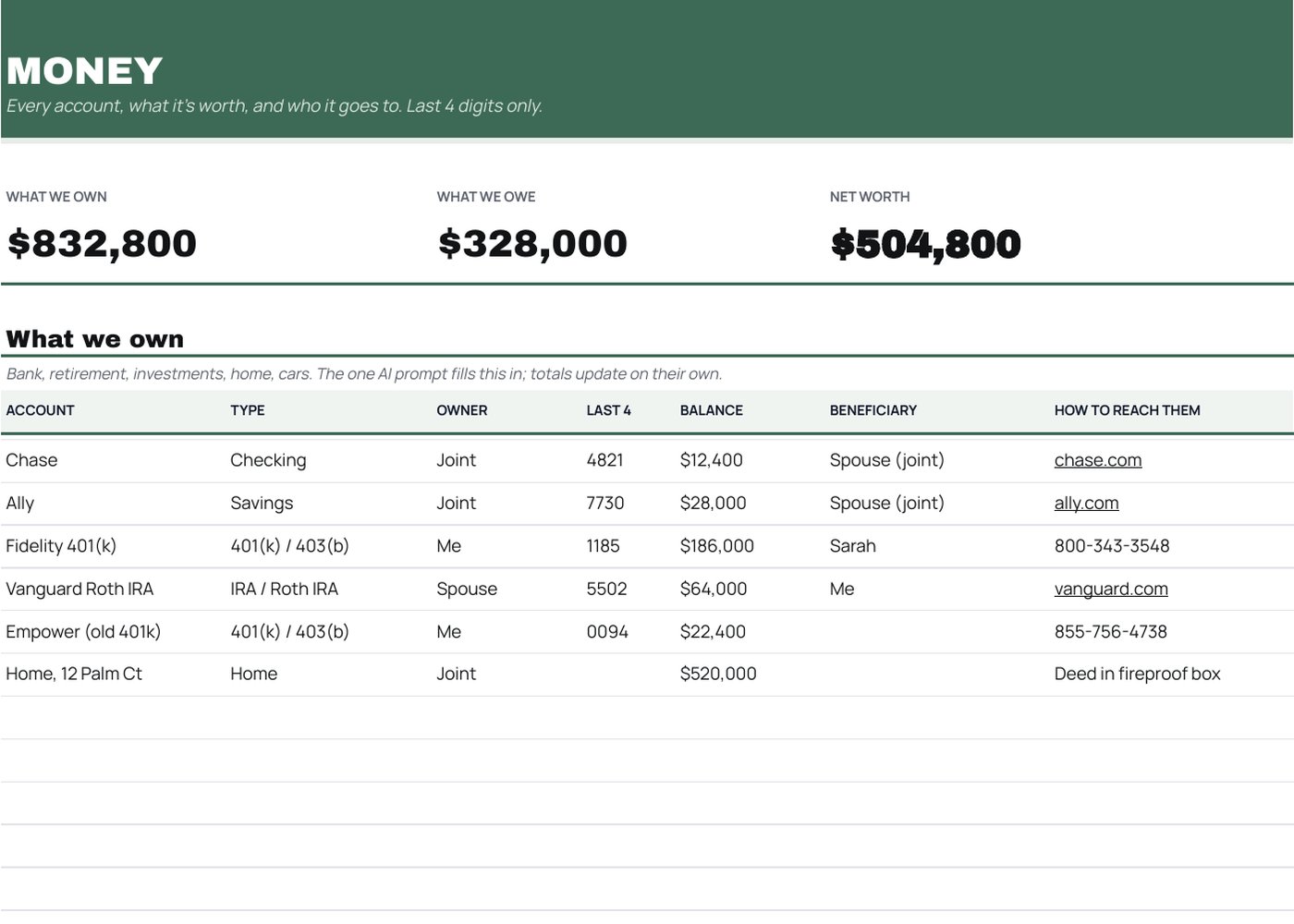
Five sections cover what your family needs to find. Totals add themselves up, Start Here lists everything you own, and the Playbook fills in from your answers.
People
Who to call first, in order. Kids, pets and guardians.
Money
Every account and debt, every beneficiary, and which income stops.
Insurance & Bills
Every policy, plus what to keep paying and what to cancel.
Documents & Logins
Where the papers, keys and photos are. How to get into your phone.
Wishes
Final wishes, medical basics and a "read this first" letter.
Screenshots show sample data. Your copy starts blank.
Because knowing where everything is only solves half the problem.
Your family also needs to know what to do, and in what order. The Playbook walks them through it and fills in from your answers: "Call Lee & Park Law at 555-0161." "Cancel Netflix and Spotify."
Call the executor by name. Care for kids and pets. Don't close any accounts.
Order death certificates. Call each life insurer on your list. Call HR and Social Security.
Meet the estate attorney. Contact each bank. Cancel the bills you marked "Cancel."
Alive but unable to decide? Find the healthcare proxy and keep the bills paid.
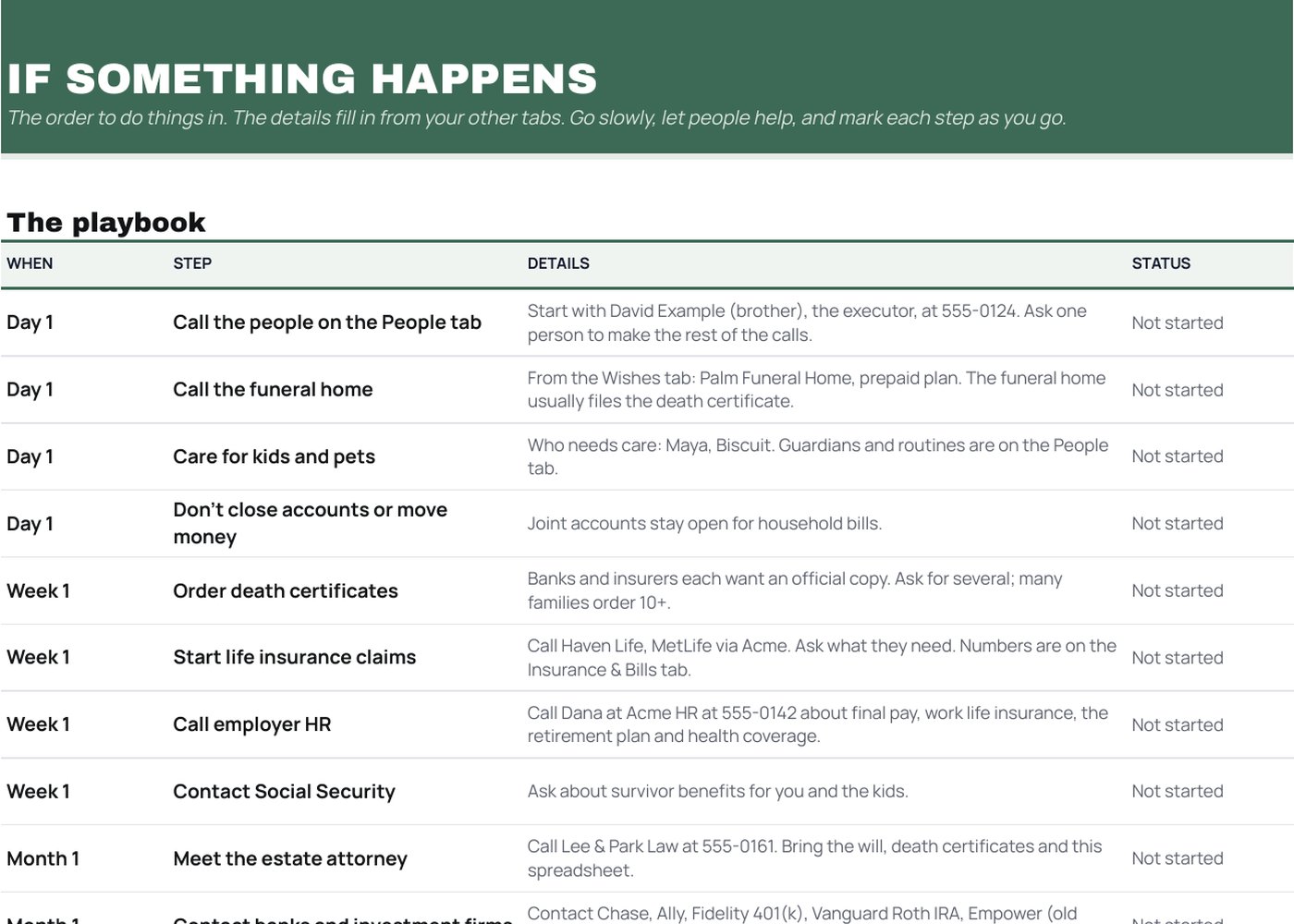
Most organizers stop at a list. This one tells your family what comes first.
Everything you get for $39.

The workbook: Start Here, AI Setup, People, Money, Insurance & Bills, Documents & Logins, Wishes, the Playbook and the Update Log.
- Built for Google Sheets; Excel download included
- Playbook fills in from your answers

One copy-and-paste prompt for Claude or ChatGPT that fills in your spreadsheet, plus optional extras, a step-by-step guide with screenshots and a printable version. Includes the monthly check-in.
- Works on free or paid AI plans
- Last 4 digits only, built into the prompt
For every state: where to get the official power of attorney and healthcare proxy forms, how they must be signed, and the questions to ask your lawyer.
- Links to official state sources only
- 21-page PDF

A 33-page printable version for anyone who wants it on paper, plus sample power of attorney and healthcare proxy documents to review with your lawyer.
- Samples are not for signing
- Print one tab or all of them

Three short talks that get your parents set up too, with the exact words for each and what to say when they push back.
- Covers your parents' household
- 10-page PDF
One-time payment. Instant access. 7-day money-back guarantee.

Hi, I'm Ian.
I'm a lawyer and a financial educator, and more than 300,000 people follow me for straight talk about money. The question I hear most is some version of "Would my family know what to do?" I built The Last Spreadsheet so the answer is yes, and so it stays yes.
If it isn't useful, email me within 7 days for a full refund.
Do it for the people who count on you.
Ten minutes with AI now. A clear place to start for your family, kept current every month.
Secure checkout by Stripe. Apple Pay and Google Pay accepted.
By purchasing you agree to the Terms and Disclaimer and join Ian's email list. Unsubscribe anytime.
Before you buy.
Still deciding? Email support@ianbuildswealth.com and I'll answer.
Is this a will?
No. It organizes everything and tells your family where it is. It doesn't replace a will, trust or power of attorney. The Documents tab and the 50-State Guide show which of those to ask an attorney about.
I already have a will. Do I need this?
Yes. A will says who gets what. It doesn't list your accounts, which bills autopay, where the policies are or how to get into your phone. That's what your family will be searching for, and it's what this organizes.
Do I have to use AI?
No. AI makes it faster. You can type everything in yourself, and the spreadsheet works the same.
Is it safe to upload my statements to AI?
The guide shows you how to keep your chats out of AI training and to black out full account numbers before you upload. The prompt tells the AI to keep only the last 4 digits, and your spreadsheet never holds a password, Social Security number or full account number.
How does it stay up to date?
An optional monthly check-in prompt is included. Schedule it in your AI and it searches your email for changes and gives you the rows to update. No scheduling on your plan? Run it yourself from a calendar reminder.
How long does it take?
About 10 minutes with AI if you upload your statements, about 20 if the AI interviews you instead, or an afternoon by hand. Plus 3 minutes to share it with your family.
Couldn't I just ask ChatGPT to make me one?
You could get a list. You wouldn't get the Playbook that turns your answers into "call this person, then this one," the Start Here page that flags missing beneficiaries, the monthly check-in, or a lawyer's checklist of what families actually go looking for. The prompt is the fast part. The structure is the product.
What if it's not for me?
Email support@ianbuildswealth.com within 7 days of purchase with your receipt for a full refund.
Can I set one up for my parents?
Yes. Your purchase covers your household and your parents' household. The included Parents' Conversation Guide gives you the scripts and questions to do it.
I'm single, or we don't have kids. Is it for me?
Yes. Someone will have to sort out your affairs: a parent, a sibling or a friend. They need this map too.
How do I get it?
Right after checkout you land on a page with your copy link, the step-by-step AI guide with screenshots and your bonuses. We email you the same links.